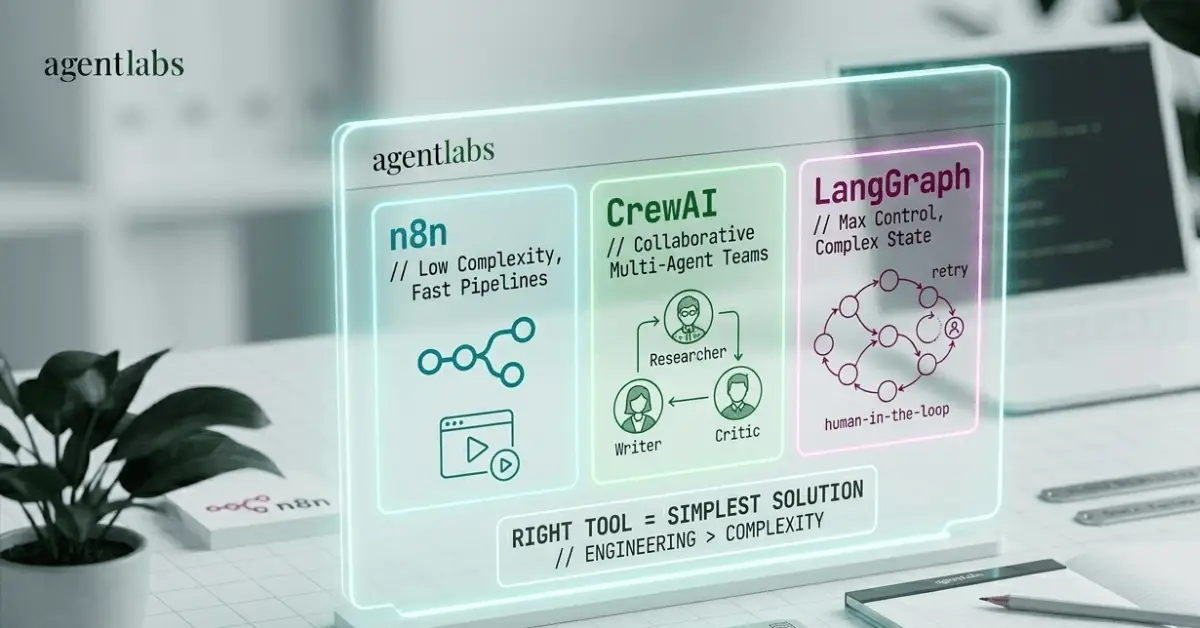
Multi-Agent Systems vs. Single Agents: When to Use CrewAI, LangGraph, or Just a Simple n8n Workflow
Not sure whether to use CrewAI, LangGraph, or n8n for your AI project? This practical guide breaks down exactly when each tool makes sense.
I’ll be honest with you — I spent a embarrassingly long time overthinking this.
When I first started getting into AI agents, I kept seeing people throw around frameworks like CrewAI and LangGraph like they were the only serious options. Meanwhile, I was over here building things in n8n, wondering if I was somehow doing it wrong. Was I not “technical enough”? Was my approach too simple to be taken seriously?
Here’s what I’ve figured out after building actual workflows — the kind that digest news feeds, process satellite data, and run automated pipelines for real clients: the right tool is the simplest one that solves the problem. Not the most impressive-sounding one.
So let me break this down the way I wish someone had broken it down for me.
First, What Are We Even Comparing?
Before we get into when to use what, quick lay of the land:
n8n is a visual, node-based automation tool. You connect blocks — triggers, actions, AI nodes — and data flows through them. No deep coding required, though you can write JavaScript when needed. I’ve built some genuinely complex systems in n8n, including a full AI-powered news digest agent that pulls from RSS feeds, filters by topic, and delivers a formatted email — built and running without a single line of Python.
CrewAI is a Python framework for building teams of AI agents. You define agents with specific roles (researcher, writer, critic), give them tools, assign them tasks, and they collaborate toward a shared goal. The metaphor is a crew of specialists working a project together.
LangGraph is built on top of LangChain and takes a different approach — it models your agent logic as a graph of nodes and edges, where each node is a step and edges define what happens next. It’s designed for workflows that need cycles, conditional branching, and fine-grained state management.
The Question That Actually Matters
Forget which framework is “most advanced.” Ask this instead:
What does my task actually need?
If the answer is “move data from A to B, maybe run it through an AI model along the way” — you almost certainly don’t need CrewAI or LangGraph. You need n8n. I’ve seen developers reach for LangGraph to build something that could’ve been a 12-node n8n workflow finished in an afternoon.
If the answer is “I need multiple AI agents with different skills to work together and produce something I couldn’t get from a single prompt” — that’s when the heavier frameworks start earning their complexity cost.
When n8n Is the Right Call
n8n lives in a sweet spot that often gets underestimated.
I use it for anything that’s fundamentally a pipeline: something comes in, gets processed, goes out. The AI Agent node in n8n is genuinely powerful — it can call tools, reason through tasks, and return structured output. When I built the news digest workflow, I had it pulling from multiple RSS feeds, filtering articles by relevance to tech, AI, and cybersecurity, then generating a clean HTML summary and delivering it via Gmail. That’s a real AI agent doing real reasoning, and I built the whole thing visually.
Reach for n8n when:
- Your workflow is linear or mostly linear
- You need to integrate multiple apps and services quickly (n8n has hundreds of native integrations)
- Non-technical teammates need to understand, use, or modify the workflow
- You’re prototyping fast and want to validate before committing to code
- The task doesn’t require agents to coordinate with each other
There’s also a practical consideration if you’re thinking about income from your builds: n8n is something you can sell to non-technical clients. I can hand a client a visual workflow they can see and understand. Try explaining a LangGraph state machine to a small business owner.
When CrewAI Makes Sense
CrewAI’s value proposition is specialization and collaboration.
The mental model is: you’ve got a task that genuinely benefits from having multiple “experts” with different perspectives working on it. A researcher who gathers information, a fact-checker who validates it, a writer who synthesizes it, a critic who reviews the output. In a single-agent setup, you’re asking one model to do all of that in one shot, which it can — but the quality ceiling is lower.
Worth being precise here: n8n can do a version of this. You can nest AI Agent nodes, use conditional switches to route data to different prompts, and effectively simulate different “roles” within a single workflow. So it’s not that n8n is incapable of sub-agents — it’s that the dynamic collaboration between them gets messy fast. When agents need to react to each other’s outputs, pass work back and forth, and coordinate toward a shared goal, wiring that together in n8n becomes a tangle of conditions and workarounds. CrewAI handles that orchestration for you as a first-class feature.
The “crew” metaphor isn’t just marketing. When you define a CrewAI agent with a specific role and backstory, you’re essentially priming that model instance to perform that role throughout the workflow. The agents can pass work between each other, and the orchestration is handled for you.
Reach for CrewAI when:
- Your task naturally breaks into distinct expert roles that need to react to each other
- You want collaborative output quality — like a content pipeline where research, writing, and editing are genuinely separate stages
- You’re building something for clients who need multi-step research or analysis
- You want faster setup than LangGraph for multi-agent scenarios with clear role boundaries
The tradeoff is that CrewAI is more opinionated. You get the collaboration structure for free, but you give up some control over exactly how the agents interact. For most use cases, that’s a fine trade.
When LangGraph Is the Answer
LangGraph is the one you reach for when the other two genuinely can’t do what you need.
The key concept is state. LangGraph lets your workflow remember what’s happened across multiple steps and make decisions based on that full history. You can have a node that checks a condition, sends the flow down one branch, loops back when something fails, pauses for human approval, then continues. This is extremely hard to do well in n8n and not what CrewAI is designed for.
Picture a system that ingests real-time sensor readings from dozens of field locations, needs to cross-reference them against historical baselines, trigger different alert paths depending on which thresholds are crossed, and retry failed data fetches without losing the state of what’s already been processed. That kind of workflow — where the agent’s next move genuinely depends on the full accumulated context of what’s happened so far — is where LangGraph earns its complexity cost.
Reach for LangGraph when:
- You need an agent that can loop, retry, and recover from errors dynamically
- Your workflow has complex conditional branching that changes based on intermediate results
- You’re building something that needs persistent state across many steps
- You need human-in-the-loop checkpoints
- You’re comfortable in Python and want maximum control over execution
There’s one more consideration worth naming: scale. If you’re running hundreds of thousands or millions of executions, n8n’s Node.js backend has real CPU and memory overhead that starts to matter. A stateless Python microservice running LangGraph logic, deployed on serverless infrastructure, can scale horizontally in ways that a self-hosted n8n instance simply won’t. For most projects this never comes up — but if you’re building something with serious production volume, it’s worth factoring into the decision early rather than discovering it when you’re already deep into a rewrite.
The general cost of LangGraph is still real regardless: steeper learning curve, more boilerplate, and significantly more to debug when something goes wrong. If you don’t genuinely need that control or scale, you’re paying a tax you didn’t have to pay.
The Complexity vs. Capability Trade-Off
Here’s the thing I want you to actually internalize, because this took me a while to get:
More complexity doesn’t mean more capability in practice.
A well-built n8n workflow with an AI Agent node and a few tool integrations will outperform a poorly-designed CrewAI setup on nearly every real-world task. The framework doesn’t do the thinking for you — it just determines how your agents are structured.
The intuition is:
- n8n → low complexity, surprisingly high capability for most automation tasks
- CrewAI → medium complexity, high capability for collaborative multi-agent output
- LangGraph → high complexity, highest control ceiling for stateful, cyclic, or branching agent logic
The mistake I see people make — especially those new to agents like I was — is jumping straight to LangGraph because it sounds the most serious. You end up spending two weeks setting up infrastructure for a task that n8n could have handled in two hours.
A Real-World Test
Ask yourself these questions in order:
- Does this task require real-time AI decisions, or is it just moving and transforming data? If it’s mostly data movement with maybe one AI step — start with n8n.
- Does it require multiple agents with distinct expertise working toward a shared output? If yes — look at CrewAI.
- Does it need loops, complex branching, or persistent state that changes the course of the workflow? If yes — you probably need LangGraph.
- Who’s going to build and maintain this? If it’s a non-technical client or team — n8n. If it’s developers who’ll live in the codebase — Python frameworks become more practical.
Most of the time, if you’re honest about what the task actually needs, you’ll end up at n8n or a single-agent Python setup. Multi-agent orchestration is genuinely powerful, but it’s for genuinely complex tasks.
The One Thing I’d Tell My Earlier Self
When I first got into AI agents, I had this sense that the “real” work happened in Python frameworks, and n8n was for beginners. I was wrong.
I’ve built production systems using all three of these tools — from a national environmental monitoring platform that processes sensor data across dozens of field sites for a client, to automated content pipelines, to personal productivity workflows. The through-line isn’t which framework I used. It’s whether I matched the tool to the actual complexity of the problem.
Start simple. Prove the concept. Add complexity only when the simpler version genuinely can’t do what you need.
That’s not a beginner’s approach — that’s engineering